Drop the track
Drag a file into the window or pick one: WAV, MP3, FLAC, AIFF or OGG.
A steady tempo for your Suno track in one click
Free · no limits
Standalone app for Windows, macOS (Apple Silicon) and macOS (Intel). No sign-up, no keys.
four steps
Drag a file into the window or pick one: WAV, MP3, FLAC, AIFF or OGG.
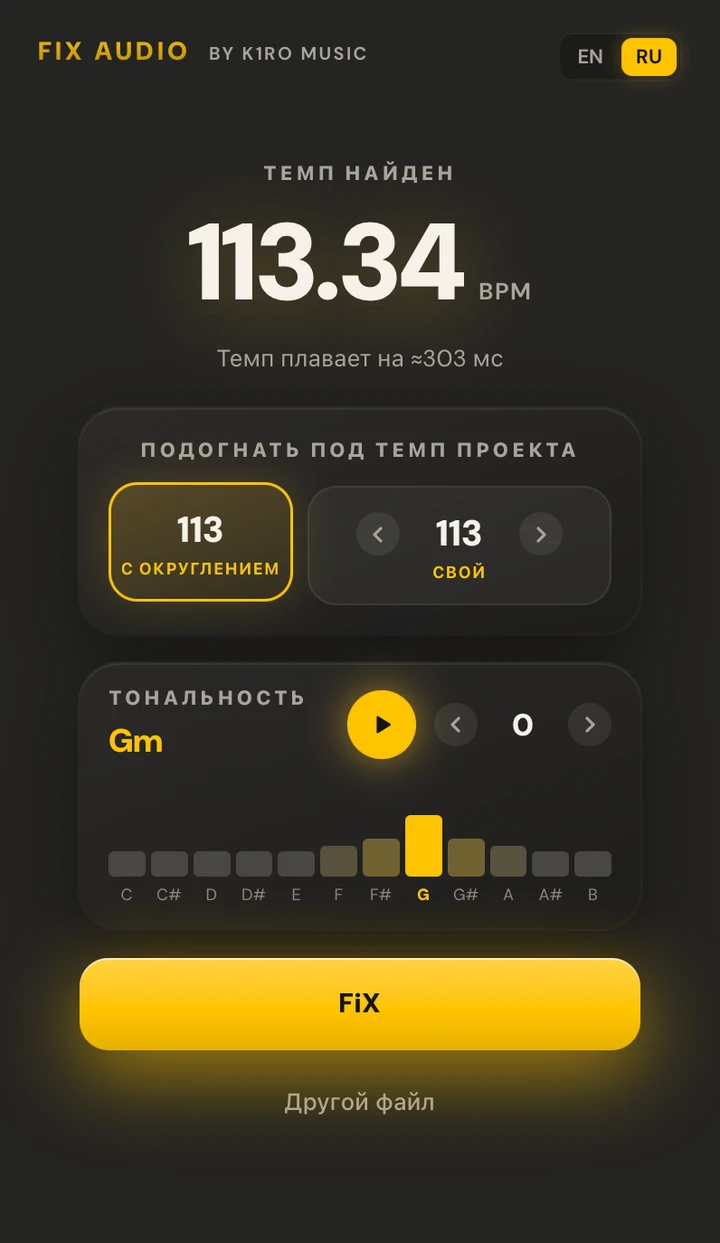
The app shows the tempo it found and how much it drifts. If the track can be read at two tempos, it offers the second one.
The nearest whole BPM in one click, or your own down to a tenth. Shift the key if you like.
Compare Original and Flattened right in the window and save a WAV with the tempo in its file name.
what's inside
Suno tracks and live recordings drift: hits wander tens of milliseconds off the grid. Fix Audio stretches the track smoothly, in one pass, along a map of every hit it found — no jumps or clicks at the seams.
The app shows the tempo it found and fits the track to the nearest whole BPM or to yours, down to 0.1 BPM.
Fix Audio detects the track's key and shifts it by up to ±12 semitones in the same pass as the tempo. You can preview the shift before processing.
Analysis and processing run without the cloud or the internet: the track is never uploaded. It runs on modest Macs too.
system requirements
| Item | Minimum | Recommended |
|---|---|---|
| OS | Windows 10 x64; macOS 11 on Intel, macOS 12 on Apple Silicon | Windows 11, macOS 14 or later |
| WebView2 | If it's missing, the Windows installer downloads and installs it | Already included in Windows 11 |
| CPU | Any 64-bit Intel or AMD, Apple Silicon | Apple Silicon (M1 or later) or a modern 6-core CPU |
| Memory | 4 GB | 8 GB — for tracks longer than 10 minutes |
| Disk | 1 GB for the app plus room for tracks | A minute of 24-bit 48 kHz WAV is about 17 MB |
| Internet | Not required | — |
questions
Nothing: Fix Audio is free — no sign-up, no keys and no limit on the number of tracks.
Suno generates tracks without a metronome, so the tempo drifts: hits wander tens of milliseconds away from the DAW grid. That makes it hard to drop the track into a project, add your own drums or mix it with other parts — Fix Audio puts every hit on a steady grid.
The track is stretched smoothly in one pass, with no limiter and no resampling: the sample rate stays the same as the source and the output is a 24-bit WAV. If peaks go over 0 dBFS after stretching, the app turns the whole track down by just enough and tells you so in the window.
If the track can be read at two tempos (say, 70 and 140), the app offers the second one right away. You can also set the project tempo by hand, down to a tenth of a BPM.
Right-click the app → Open and confirm. You only need to do this once — after that it opens as usual.
That's SmartScreen: it warns about apps that few people have downloaded yet. Click More info → Run anyway — you only need to do this once.
No. Analysis and processing run right on your computer; the track is never uploaded.
Suno is a trademark of Suno, Inc. K1RO is not affiliated with Suno, Inc. The rights to each track belong to its author.